Learning Tools Interoperability
The SolidProfessor platform required an upgrade to its Learning Tools Interoperability (LTI) feature to meet new compliance standards and enable the transition from the legacy system to the 2.0 platform. The initial release of the LTI feature in Q1 2023 allowed for basic functionality, but to fully leverage the benefits of the 2.0 platform, certification is now essential. This update will streamline the integration process, ensure compliance with the latest standards, and allow us to efficiently migrate schools from the legacy site to the improved 2.0 system.
Duration: March 2024 - April 2024
My Role: UX Designer
Team: PM, QA Engineer, Frontend Developers, Backend Developers
✿ ✿ ✿ ✿ ✿
I. Overview
What is LTI
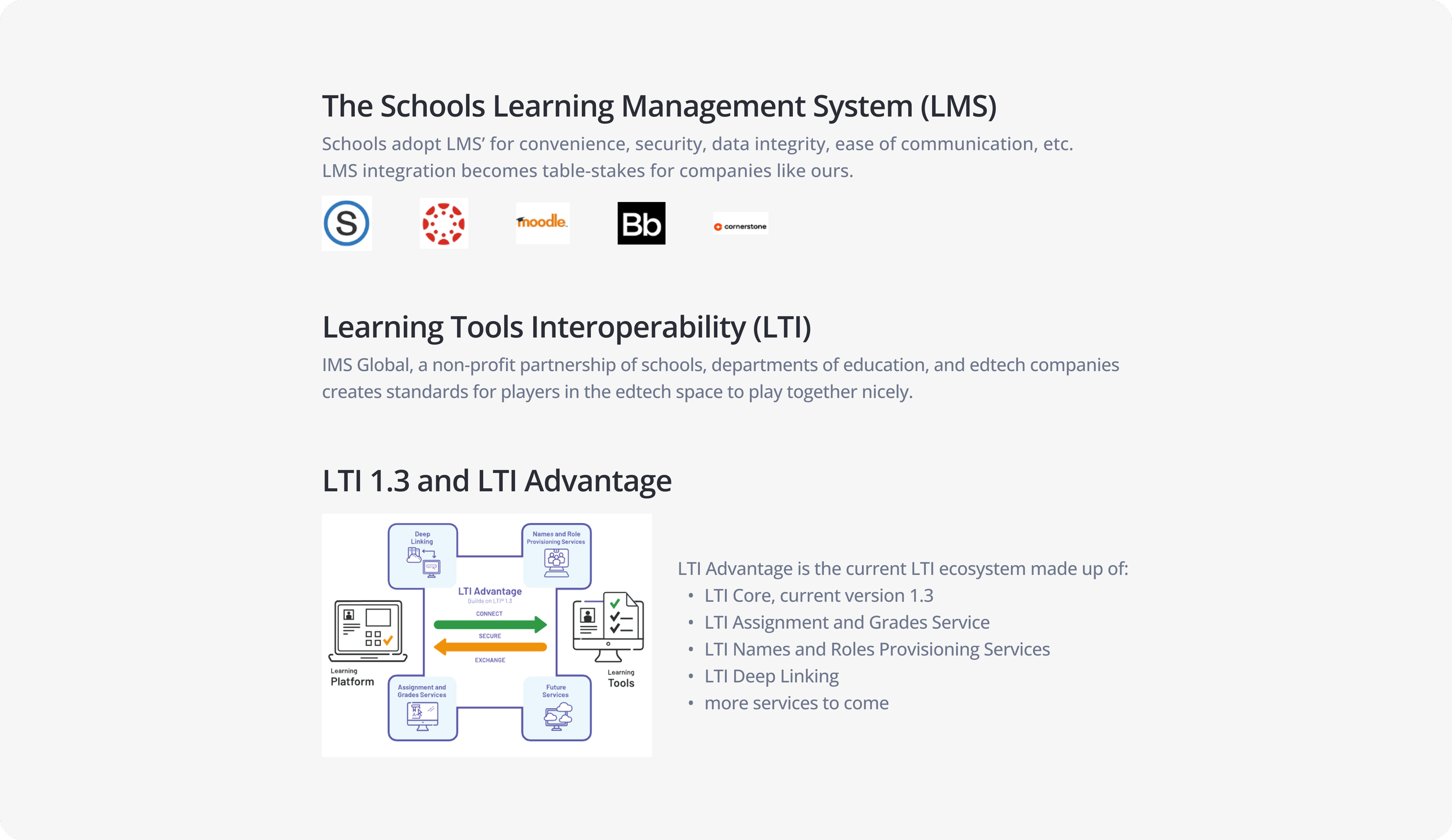
LTI is an educational technology developed by the IMS Global Learning Consortium. It allows Learning Management Systems (LMS) to link to external courseware and learning tools directly within the LMS environment, facilitating integration between different educational platforms. The addition of LTI to the SolidProfessor platform allows us to expand our reach, integrate more effectively with users' existing systems, and provided a more cohesive and streamlined experience.
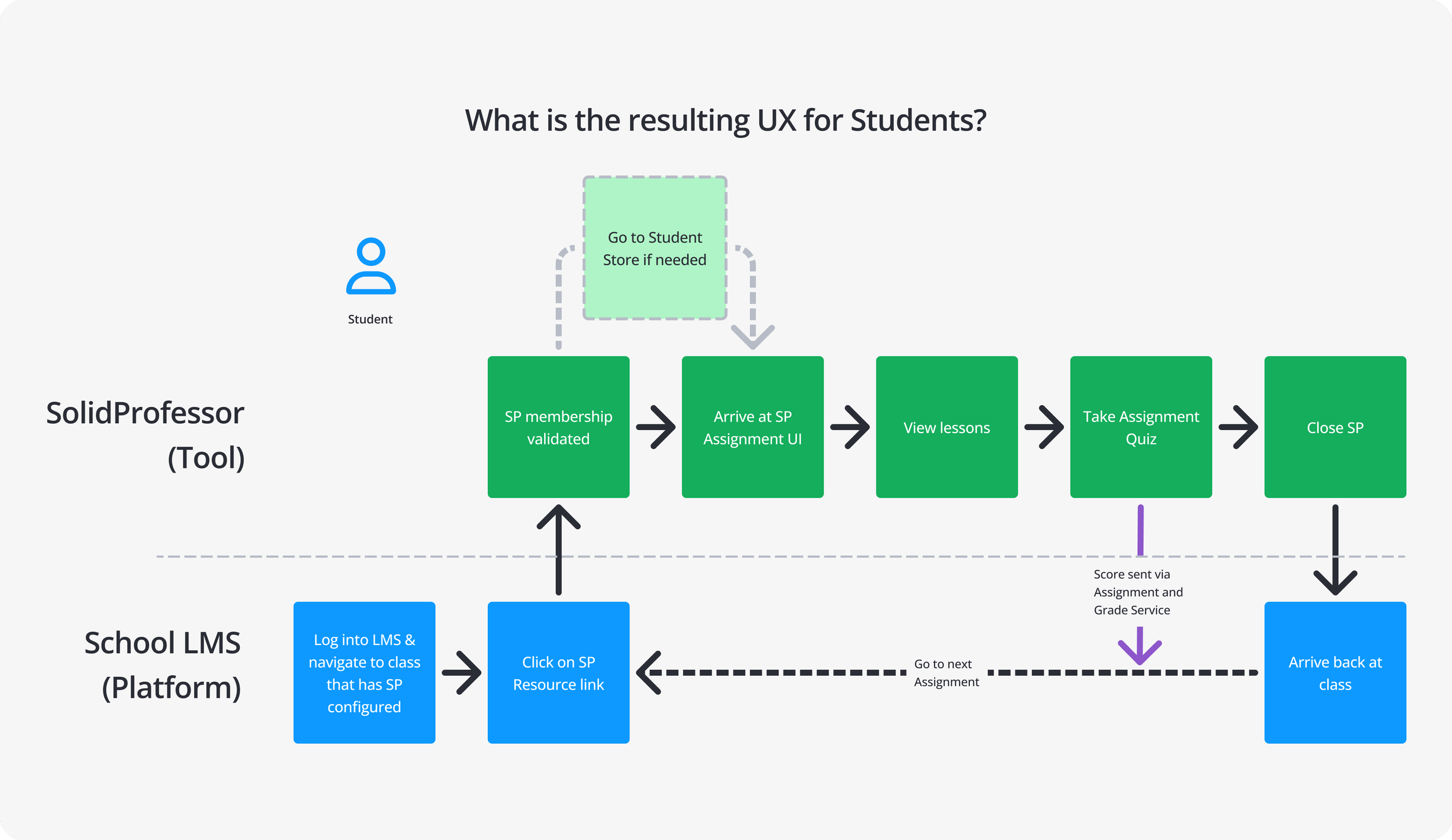
Problem
SolidProfessor's LTI integration was designed to enable seamless connections between our platform and external Learning Management Systems, allowing us to transition users from the legacy system to the 2.0 platform. However, the current v1 LTI setup is preventing us from obtaining certification, leading to delays in migrating users off the legacy system and limiting adoption of the 2.0 platform.
Solution
To address these challenges, we will upgrade the LTI integration to meet current certification requirements. This will simplify the setup process, reduce the need for manual support, and enable us to achieve LTI certification. With certification in place, we can begin transitioning users from the legacy system to the 2.0 platform, enhancing user experience, minimizing reliance on outdated systems, and boosting adoption of the new platform.
✿ ✿ ✿ ✿ ✿
II. Research and Collaboration
The LTI project was initiated by one of our Senior Backend Developers, who played a crucial role in understanding LTI and its certification requirements. I quickly became involved due to the project's potential impact on our users. My initial efforts were focused on grasping the complexities of LTI, and working closely with the Senior Backend Developer to identify limitations, gather examples, and review documentation.
To ensure effective collaboration, I facilitated meetings with the Product Manager, Customer Success (CS) Team, Director of Product, and Application Support Engineer. I led these sessions to provide insights into the previous LTI setup and pinpoint areas for improvement. Throughout the project, I kept the Product Manager informed and engaged, ensuring they were well-acquainted with the project’s progress and developments.
While researching, we encountered a few key challenges:
Learning Curve: LTI is incredibly complex. There were multiple times when we thought we had found a solution, only to learn new information that required us to shift our approach.
Communication: With the continuous changes in our understanding of LTI, it was challenging to keep everyone on the same page.
User flows
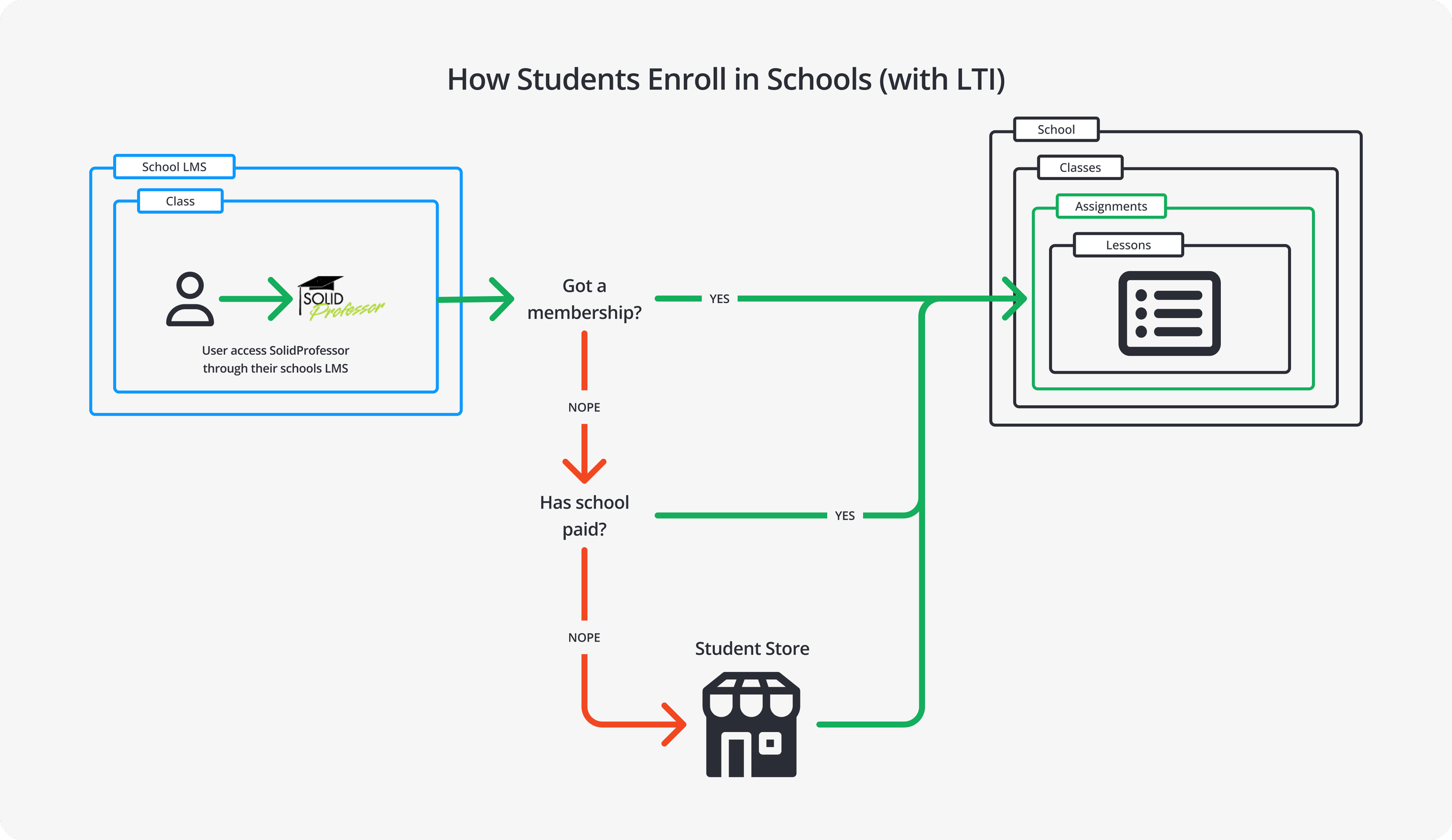
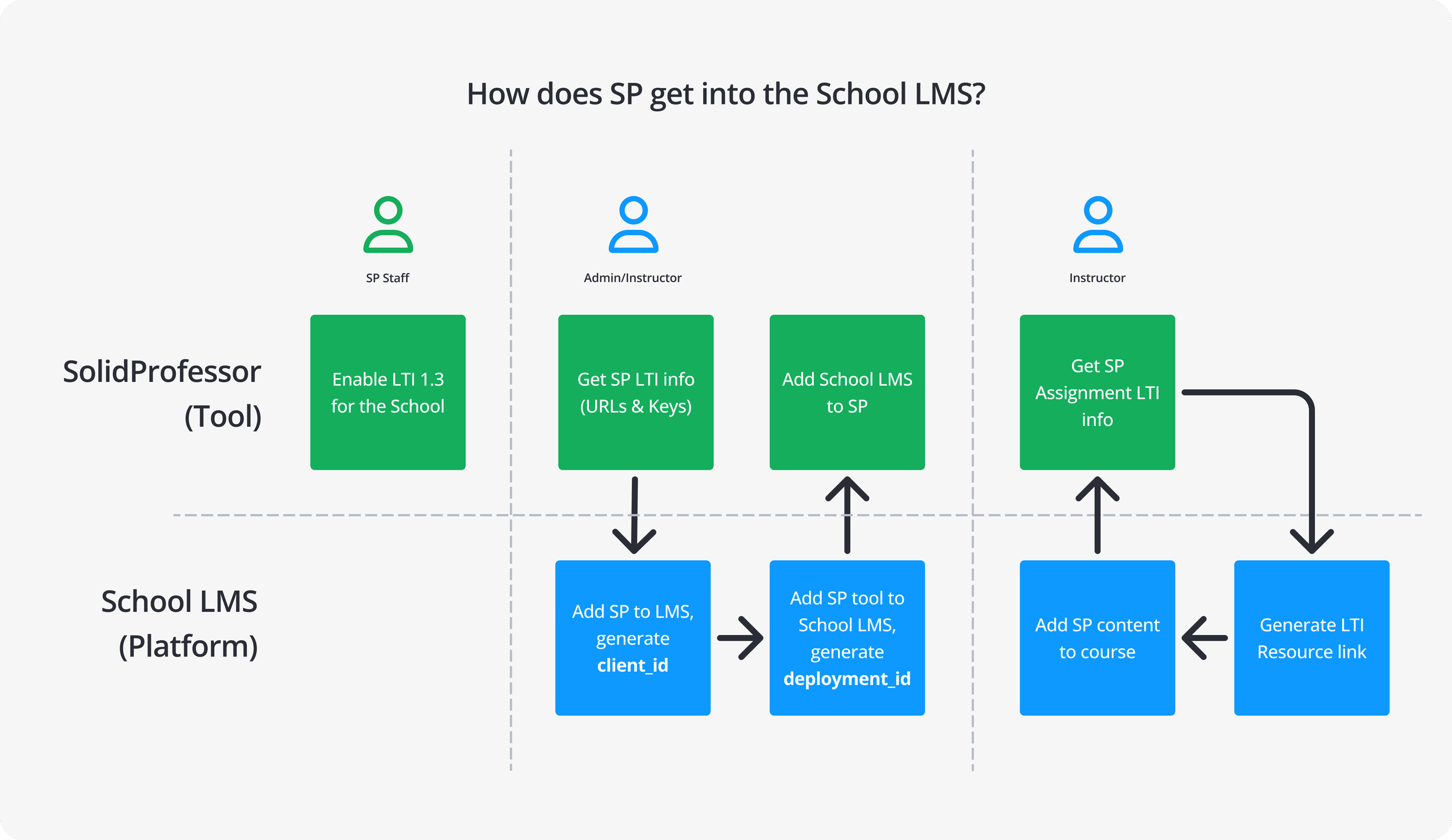
To ensure a seamless user experience, we focused our research on understanding the key goals of our users, including District Admins and CS Managers. I mapped out the user flows for the project, targeting three main scenarios:
As a District Admin, I want to connect my Learning Management System (LMS) with SolidProfessor through an LTI Integration.
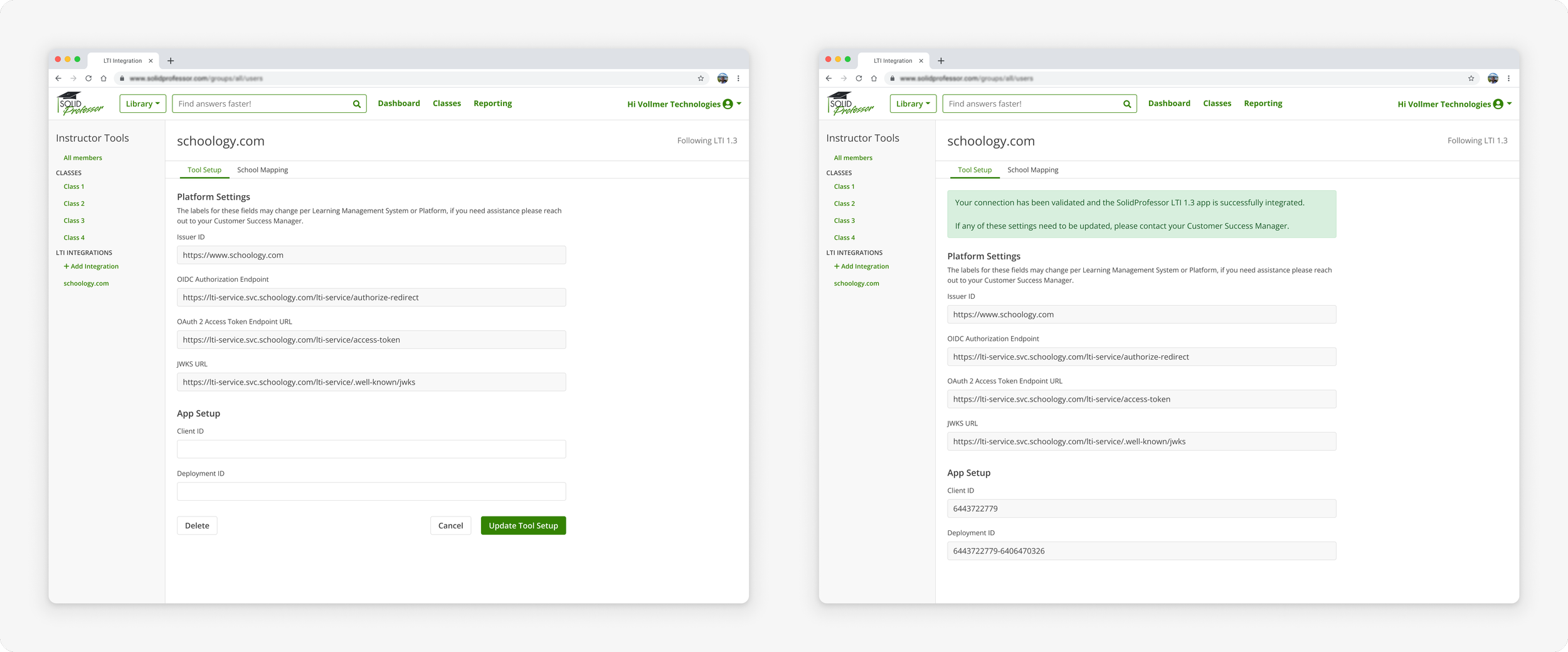
As a District Admin, I want to validate the connection between my LMS and SolidProfessor.
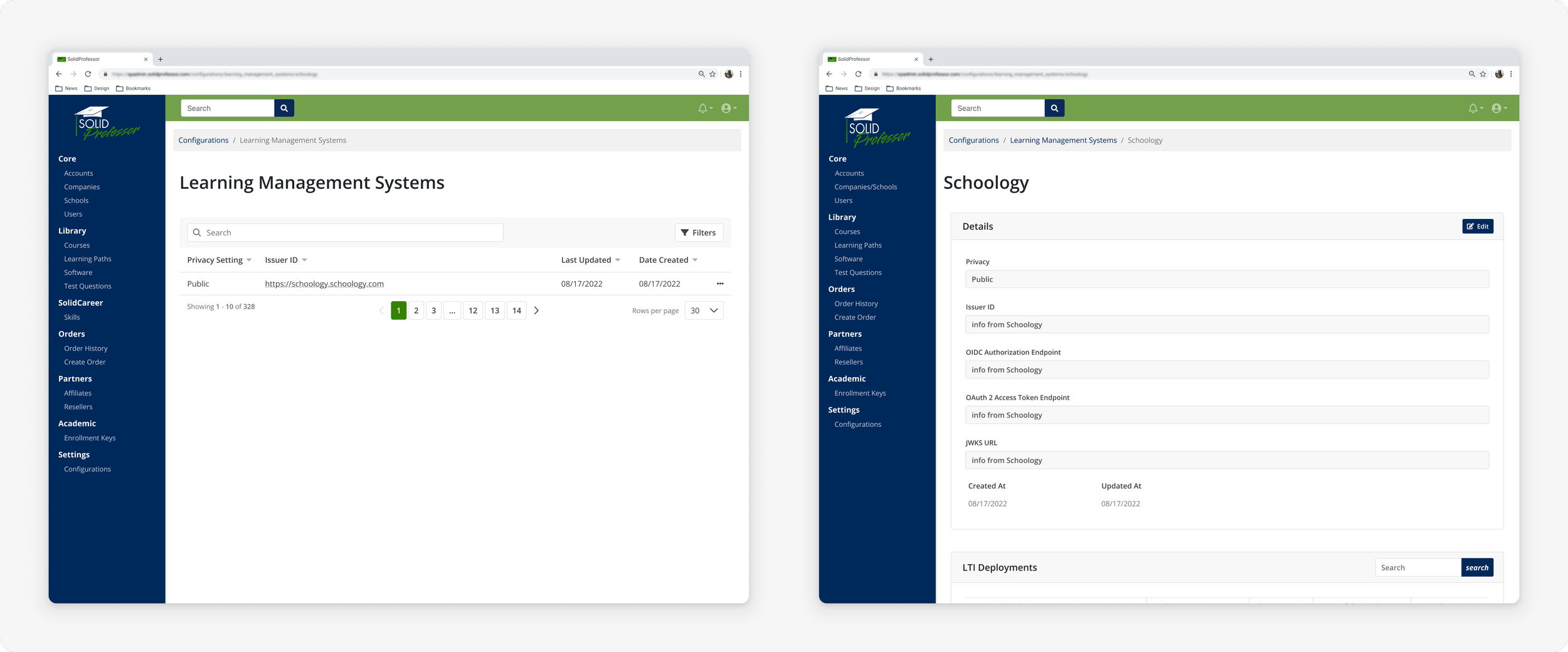
As a CS Manager, I want to manage users' LTI Integrations.
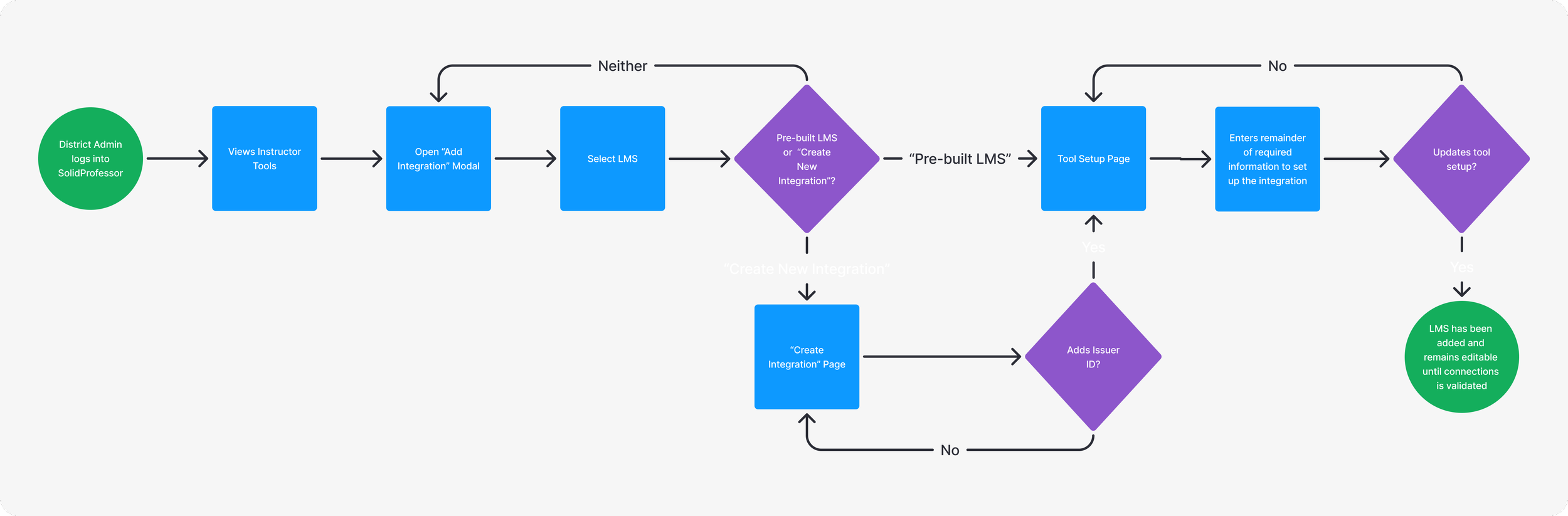
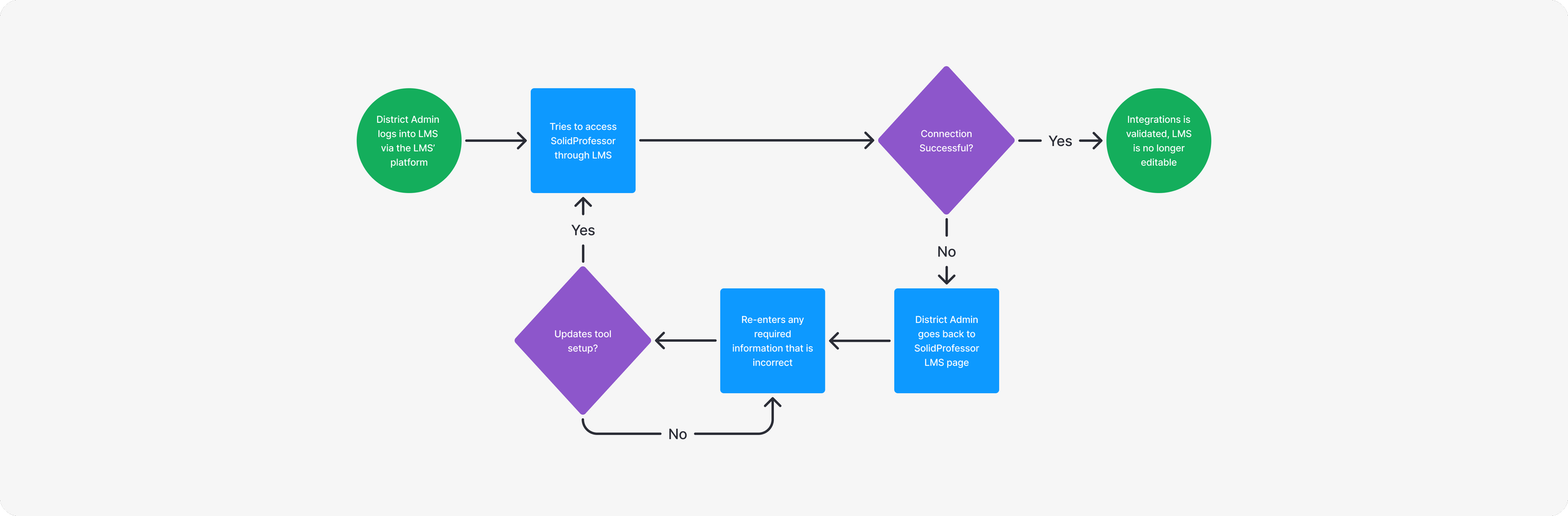
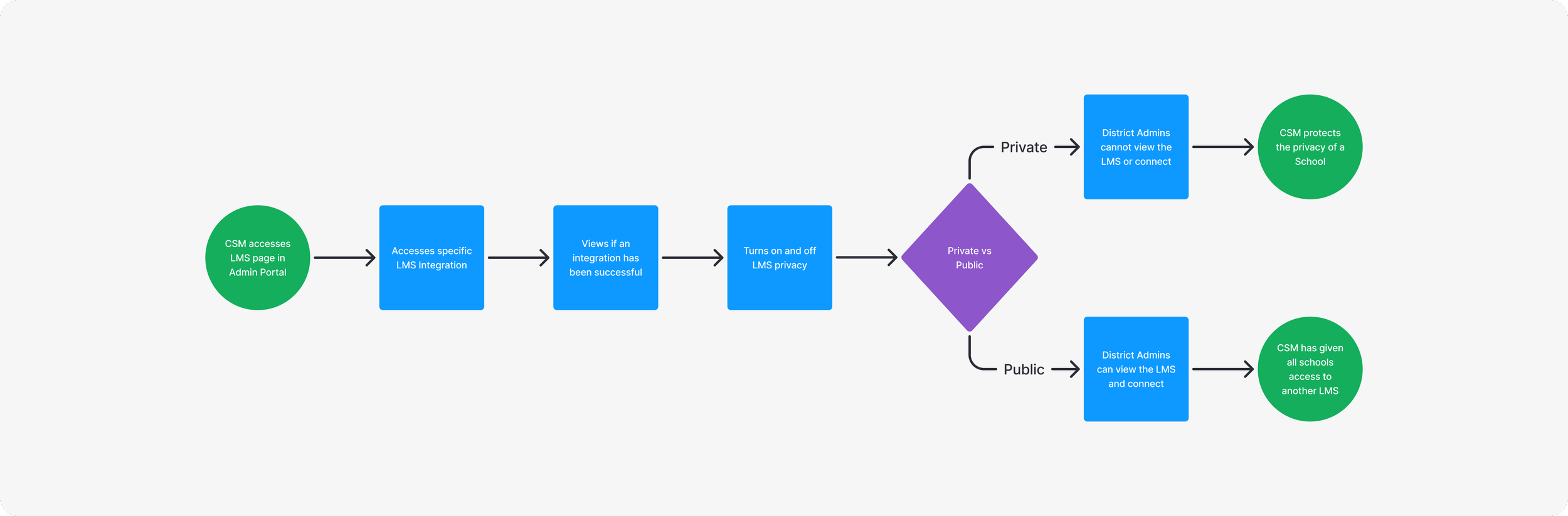
These user flows allowed us to define the core experiences that would guide the design and development process.
✿ ✿ ✿ ✿ ✿
III. Design
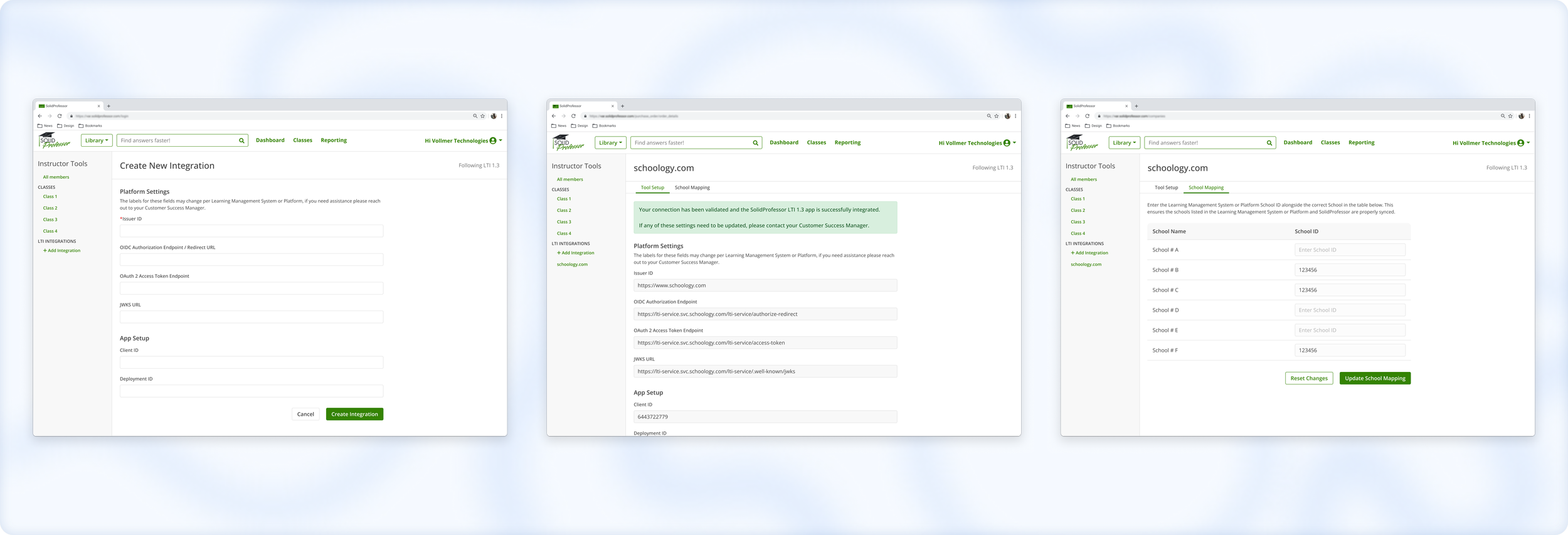
To create a seamless and intuitive user experience for the LTI integration, the design process was grounded in iterative feedback and close collaboration with stakeholders. I began with low-fidelity sketched to ensure that the layout and functionality aligned with user goals. As the project progressed, I transitioned to high-fidelity designs, refining the details to communicate the final vision. Throughout this process, close collaboration with the CS Team was crucial in making sure the designs were both user-friendly and practical for those supporting users during the integration.
Low-Fidelity sketches
To bring the user flows to life, I started with low-fidelity sketches. These designs were created to quickly visualize the primary interactions and interface elements without getting bogged down in details. The goal at this stage was to ensure the overall layout and flow met user needs and aligned with our LTI objectives.
High-fidelity Wireframes
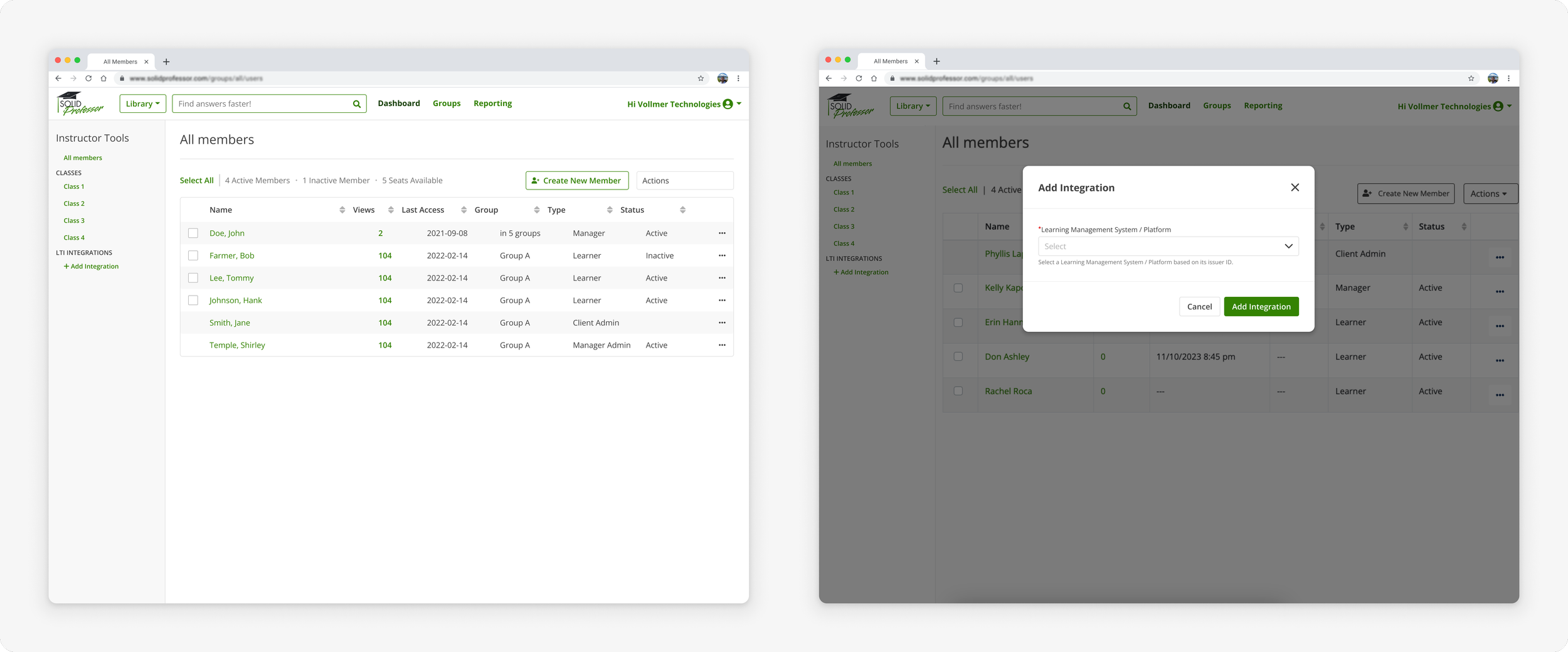
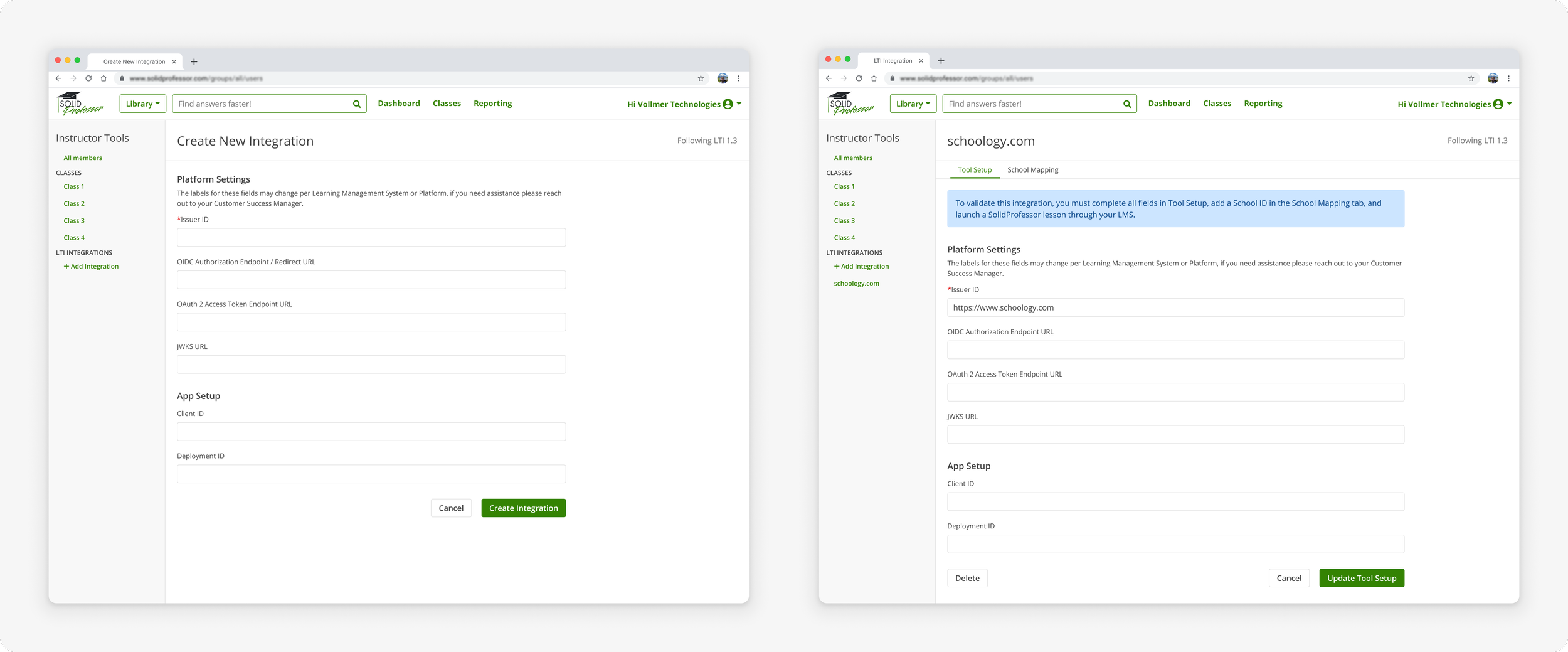
I then transitioned to high-fidelity designs, these detailed wireframes provided a clearer representation of the final interface. The high-fidelity designs helped communicate the look and feel of the application to stakeholders and facilitated more concrete feedback on specific elements. Despite the challenges of managing changes, these wireframes played a crucial role in aligning the team on the final vision for the LTI integration.
✿ ✿ ✿ ✿ ✿
IV. Iterations
To ensure our designs addressed the practical needs of those supporting users who would be interacting with the feature, we organized a review session with the CS Team. During this meeting, we walked them through the wireframes, explaining our design decisions and how each screen aligned with the user flows. The feedback given in this meeting allowed us to make adjustments to the designs before moving forward.
Naming conventions
One of the concerns raised was regarding naming conventions. Each LMS uses different terminology for the fields users need to input during the LTI integration. To address this, the Senior Backend Developer and I conducted research to identify the most common terms used across platforms. Based on our findings, we made updates to the interface to standardize the terminology as much as possible. Additionally, I included language to inform users that labels may vary and encouraged them to reach out to our CS Team for any assistance.
Moving to a Self-Service Modal
Another key insight from our meeting was that the CS Team wanted the LTI setup to be as self-service as possible. To align with this, we made adjustments to the user flows. Initially, users were expected to add new LTI connections independently, while the CS Team would manage access to premade LTI setups for schools. We revised this plan by removing the need for the CS Team to select which premade LTI setups schools could access. Instead, we introduced a new privacy setting that allows users to access any public LTIs independently. This change enabled us to offer an option for users to select both new LTI connections and premade options directly, thereby reducing the burden on the CS Team and streamlining the overall process.
✿ ✿ ✿ ✿ ✿
V. Next Steps
As we prepare for the next phase of development, our team will conduct Behavior-Driven Development (BDD) Example Mapping (EM) sessions. These sessions are designed to clarify user stories and ensure that all team members, including developers, QA engineers and product managers, have a shared understanding of the LTI requirements.
Once EM sessions are completed, our focus will shift towards building and releasing the next version of LTI, with a targeted release in Q1 2025. We also plan for UX and Product Management team members to participate in initial user setup meetings. This hands-on approach will allow us to directly observe the setup process, identify challenges, and find opportunities to iterate on the design and process.
Our long-term objectives include:
Achieving LTI certification.
Transitioning more schools to the 2.0 platform with LTI integrations.
Ensuring ongoing compliance with the latest standards to meet evolving user needs.
✿ ✿ ✿ ✿ ✿
VI. Key Takeaways
Reflecting on this project, a couple key lessons stand out that will inform my approach to future work:
Stay in Low Fidelity Longer: Moving to high-fidelity designs too quickly created challenges, as LTI's complexity required frequent changes. In the future, I plan to remain in low-fidelity longer to iterate faster and adjust to evolving requirements more effectively.
Support for Newer Team Members: Collaborating with a newer Product Manager required additional onboarding and communication. Allocating more time to bring new team members up to speed at the start of a project would help streamline decision-making and ensure better alignment moving forward.