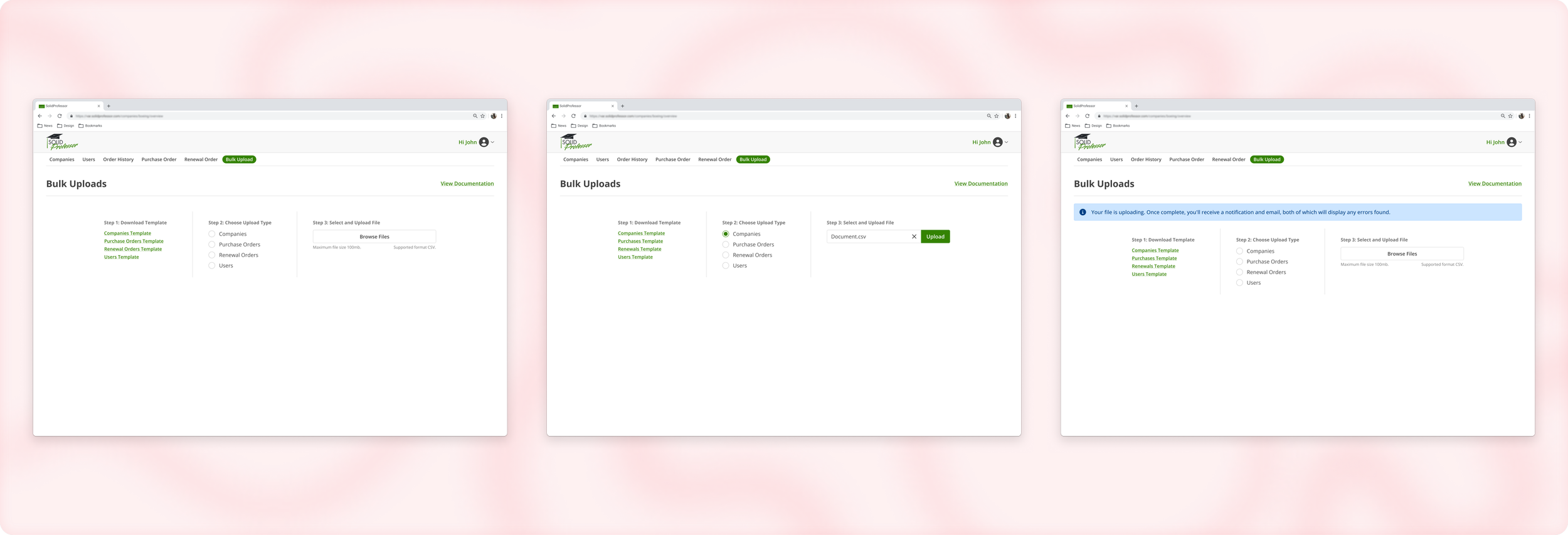
Bulk Upload
As part of SolidProfessor's distribution strategy, we sell our product through external companies known as Value Added Resellers (VARs). These VARs often bundle our offerings with engineering software solutions (e.g., SOLIDWORKS, AutoCAD, Revit), expanding our reach in both domestic and international markets. VAR Portal is a dedicated platform designed to help resellers submit orders and manage the associated companies and users, significantly boosting our commercial business. As we continue to grow, we have identified the need to enhance certain processes to improve the user experience for our resellers and increase the scalability of VAR Portal.
Duration: June 2024 - December 2024 (Definition work: June-August, Development: August-December)
My Role: UX Designer
Team: PM, QA Engineer, Frontend Developers, Backend Developers
✿ ✿ ✿ ✿ ✿
I. Introduction
The Problem
The VAR Portal's current processes for order submission, company creation, and user creation are lengthy and lack scalability, leading to delays for resellers.
The Solution
To address these challenges, we introduced a new bulk upload feature to streamline these processes and enhance their efficiency and usability. This enhancement reduces completion times for resellers from hours to minutes, increases scalability, improves their overall user experience, and facilitates easier onboarding of new users to the platform.
✿ ✿ ✿ ✿ ✿
II. Research and Discovery
Over the course of a couple weeks, the PM and I conducted user interviews with three different VAR organizations, speaking with a couple users at each. These sessions helped us understand how the current manual processes impacted day to day workflows. A few key themes emerged:
Manual Workload: Resellers handling high volumes of orders found the manual entry process extremely time consuming, especially for complex renewals that required extra steps.
Bulk Preferences: Users consistently preferred bulk operations to avoid repetitive, one at a time inputs and reduce overall effort.
Scalability Limitations: The current system couldn’t keep up with the operational demands of growing VAR teams, making it difficult to scale efficiently.
These insights directly informed our understanding of core user needs:
As a VAR Order Manager, I need a faster way to create multiple companies to streamline client onboarding.
As a VAR Order Manager, I want to upload multiple orders at once to avoid repetitive manual entry.
As a VAR Customer Success Manager, I want to add several users in one step to save time and reduce effort.
As a VAR team member, I need clear error messages so I can quickly identify and fix issues when uploads fail.
We prioritized these needs based on their place in the workflow: first, companies are created, then orders are placed, and finally users are assigned to seats. This helped shape the rollout strategy for bulk upload features in a logical, high-impact sequence.
✿ ✿ ✿ ✿ ✿
III. Design Process
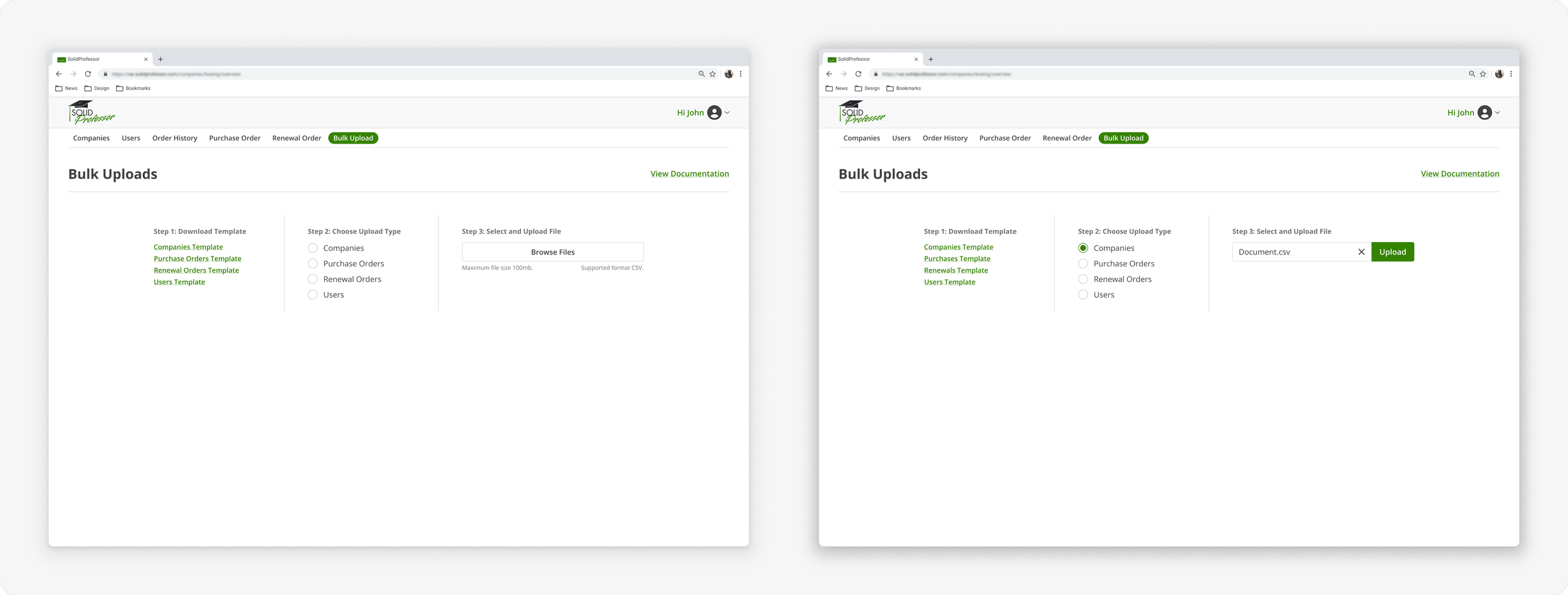
Rather than creating separate workflows for each upload type, I designed a unified bulk upload system that could handle orders, companies, and users through a single, consistent interface. This approach reduced cognitive load for users and simplified the technical implementation.
File Format and Constraints:
CSV format was chosen for maximum compatibility and ease of use.
File size limited to 3MB to maintain optimal system performance.
Downloadable CSV templates provided for each upload type to guide users on proper formatting.
Error Handling Strategy:
A key focus of the design was robust error handling. Collaborating closely with the backend developer, we created a system that:
Validates file format and size before processing.
Detects formatting errors and data inconsistencies.
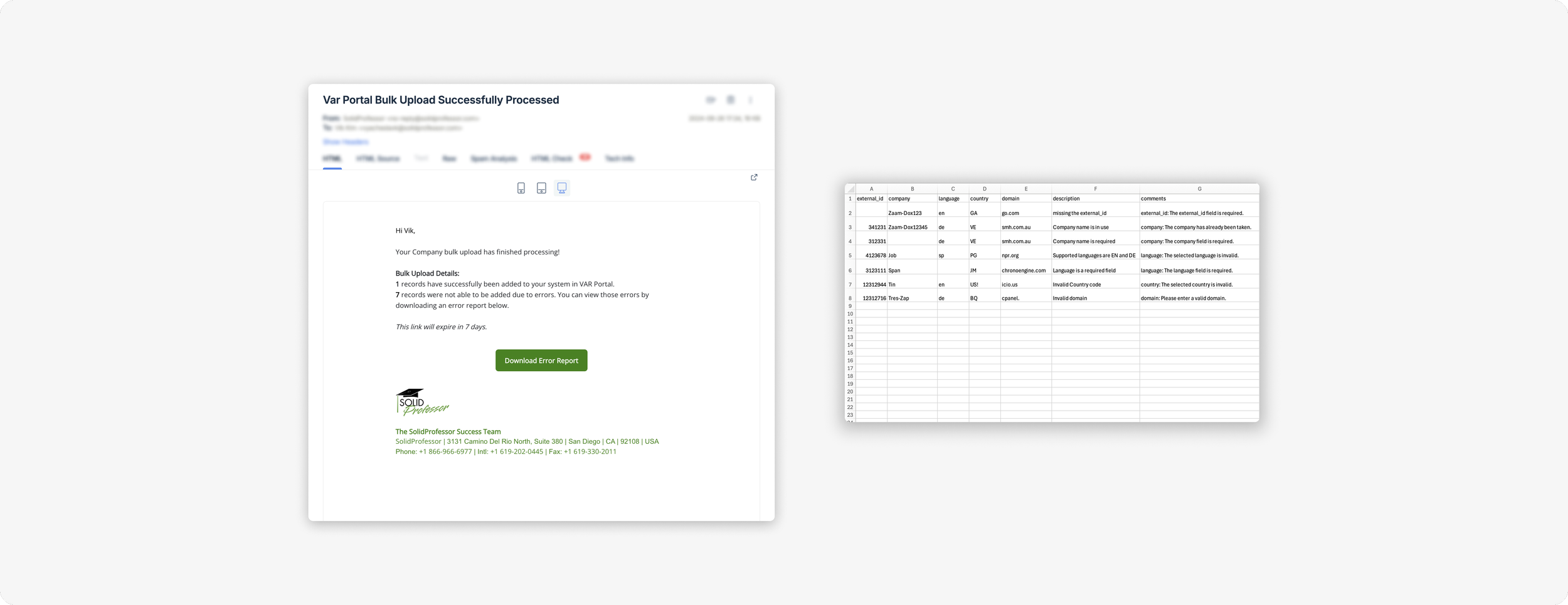
Generates a downloadable CSV report highlighting problematic rows with specific error comments.
Enables users to easily fix issues and re-upload corrected files.
Key Design Decisions:
A single upload interface with clear upload type selection to maintain consistency.
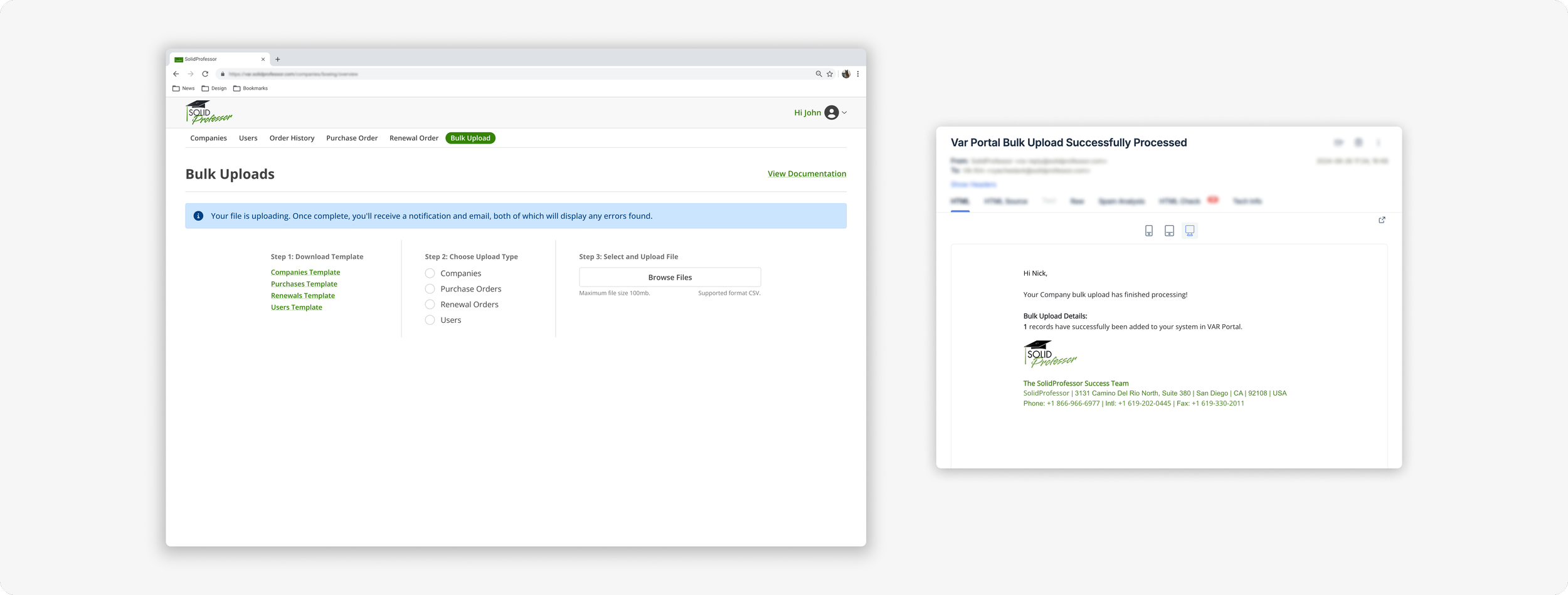
Progress indicators to keep users informed during large file processing.
Clear success and error states paired with actionable feedback.
Downloadable error reports to facilitate efficient problem resolution.
Low-Fidelity sketches
To bring the user flows to life, I started with low-fidelity sketches. These designs were created to quickly visualize the primary interactions and interface elements without getting bogged down in details. The goal at this stage was to ensure the overall layout and flow met user needs and aligned with our LTI objectives.
High-fidelity Wireframes
I then transitioned to high-fidelity designs, these detailed wireframes provided a clearer representation of the final interface. The high-fidelity designs helped communicate the look and feel of the application to stakeholders and facilitated more concrete feedback on specific elements. Despite the challenges of managing changes, these wireframes played a crucial role in aligning the team on the final vision for the LTI integration.
✿ ✿ ✿ ✿ ✿
things to include
user flow
error messages
email
notifications
CSV file
ui
all the ideas
iterations
simplifying
removing table
IV. Iterations
To ensure our designs addressed the practical needs of those supporting users who would be interacting with the feature, we organized a review session with the CS Team. During this meeting, we walked them through the wireframes, explaining our design decisions and how each screen aligned with the user flows. The feedback given in this meeting allowed us to make adjustments to the designs before moving forward.
Naming conventions
One of the concerns raised was regarding naming conventions. Each LMS uses different terminology for the fields users need to input during the LTI integration. To address this, the Senior Backend Developer and I conducted research to identify the most common terms used across platforms. Based on our findings, we made updates to the interface to standardize the terminology as much as possible. Additionally, I included language to inform users that labels may vary and encouraged them to reach out to our CS Team for any assistance.
Moving to a Self-Service Modal
Another key insight from our meeting was that the CS Team wanted the LTI setup to be as self-service as possible. To align with this, we made adjustments to the user flows. Initially, users were expected to add new LTI connections independently, while the CS Team would manage access to premade LTI setups for schools. We revised this plan by removing the need for the CS Team to select which premade LTI setups schools could access. Instead, we introduced a new privacy setting that allows users to access any public LTIs independently. This change enabled us to offer an option for users to select both new LTI connections and premade options directly, thereby reducing the burden on the CS Team and streamlining the overall process.
✿ ✿ ✿ ✿ ✿
V. Results and Impact
The bulk upload feature launched in January 2025 and has already demonstrated significant impact.
Usage Metrics (as of June 2025):
7,000+ purchase orders uploaded via bulk upload
800+ companies created through bulk upload
900+ users added via bulk upload
What previously took hours or even days, can now be completed in just minutes. Beyond time savings, the feature has eliminated the need for manual data entry in bulk workflows and improved scalability for our high-volume VAR partners.
Feedback from users has been overwhelmingly positive. VAR teams consistently cite streamlined processes and reduced operational friction as major benefits, making bulk upload a valuable part of their workflow.
Insert quotes here
✿ ✿ ✿ ✿ ✿
VI. Key Takeaways
This project reinforced several important lessons for designing B2B workflow improvements:
User-Centered Error Handling: The most valuable aspect of this feature proved to be the robust error handling system. By providing users with specific, actionable feedback, we eliminated frustration and reduced support requests.
Unified Upload System: Creating a single, consistent upload interface rather than separate flows for each data type improved both user experience and development efficiency.
Close Technical Collaboration: Working directly with backend developers throughout the project ensured that complex technical requirements (like error handling and file processing) were seamlessly integrated into the user experience.
Impact of Incremental Improvements: This project demonstrated how addressing specific workflow pain points can have significant business impact, enabling our VAR partners to scale their operations more effectively.